Close and reopen the terminal!
Sunday, September 11, 2016

Friday, September 9, 2016
How to replace iphone 5c screen
0. I highly recommend you watch this video, although it's not perfect
1. I bought this screen repair kit
2. Don't lock your broken iphone 5c. Let the battery die over time
3. Take out the two screws here:

4. Use a tiny screw driver to insert in to the power hole and lift up the screen a little bit.
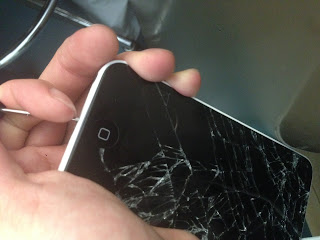
5. so that you could insert your guitar pick

6. and open the front plate
 7. Now, you need to take off the screws holding the top right metal and take out the top right metal
8. Use the blue tool to unplug the front plate

9.Now you've taken the broken screen off.
 10. put the new one back following the reverse order of this protocol.
1. I bought this screen repair kit
2. Don't lock your broken iphone 5c. Let the battery die over time
3. Take out the two screws here:


6. and open the front plate

8. Use the blue tool to unplug the front plate


New type of Phishing email targeting Caltech
From: Morgan719@caltech.edu
Dear phe,
Dear phe,
Please find attached documents as requested.
Best Regards,
Morgan
(Attached was a "Quarantined attachment")
Thursday, September 8, 2016
reorder two display screens on windows 7 / windows 8
1. right-click in a blank area on desktop
2. screen resolution
3. drag the two rectangle screens, click apply
4. click OK
2. screen resolution
3. drag the two rectangle screens, click apply
4. click OK
Wednesday, September 7, 2016
[imagej]how to count dots on an image
Two steps:
1. using a threshold to convert your image into binary form (positive + negative)
Image ▶ Adjust ▶ Threshold.
check "dark background"
Drag the bars so that the thresholds let the particles/dots stand out while leaving no background smears there
2. If your dots have overlapping groups, force them to separate:
Process ▶ Binary ▶ Watershed.
3. Analyze Particles
size: 0-infinity or leave blank
More stringent: 10-infinity
Analyze ▶ Analyze particles
Show: -> Eclipse
check display results and summarize
reference:
http://imagej.net/Particle_Analysis
1. using a threshold to convert your image into binary form (positive + negative)
Image ▶ Adjust ▶ Threshold.
check "dark background"
Drag the bars so that the thresholds let the particles/dots stand out while leaving no background smears there
2. If your dots have overlapping groups, force them to separate:
Process ▶ Binary ▶ Watershed.
3. Analyze Particles
size: 0-infinity or leave blank
More stringent: 10-infinity
Analyze ▶ Analyze particles
Show: -> Eclipse
check display results and summarize
reference:
http://imagej.net/Particle_Analysis
Tuesday, September 6, 2016
[Solved]How to unsubscribe from Caltech Marketplace email list
"1. Click on the link at the bottom of each message (https://lists.caltech.edu/lis
2. Using the email address that is subscribed to this list, send an email tomarketplace-leave@caltech.edu. It doesn't matter what you put in the subject line or body of the email (you can leave it blank). Use this option if you are away from Caltech and have no way of getting onto the Caltech network.
"
--- HN
Thursday, September 1, 2016
trimmomatic ILLUMINACLIP: how to specify an universal path for adaptor sequences file
A bug for ILLUMINACLIP 0.33:
They always add a prefix of locations which is the current path, before the file name you provide. Therefore it assumes that the adaptor file is in the current folder, which is not always true.
In order to specify a universal location, you can just specify the full path and activate its full path read mode. e.g. /usr/data/adaptors.fa
ATTENTION: never use ~ as home because it's not recognized by trimmomatic 0.33
They always add a prefix of locations which is the current path, before the file name you provide. Therefore it assumes that the adaptor file is in the current folder, which is not always true.
In order to specify a universal location, you can just specify the full path and activate its full path read mode. e.g. /usr/data/adaptors.fa
ATTENTION: never use ~ as home because it's not recognized by trimmomatic 0.33
Subscribe to:
Posts (Atom)